
Digital agencies often manage the technology stacks of dozens or hundreds of clients. Domains, hosting, SaaS subscriptions, premium plugin licenses and API accounts all have to stay current to keep client services online.
Many agencies treat renewals as an afterthought. The result is lapsed domains, surprise out-of-pocket costs and angry clients when a site goes down.
This guide covers four operational frameworks for handling renewals at scale: catching payment failures early, getting client authorization before you pay, routing expiry notices to people who will see them, and smoothing the cash-flow spikes that clustered renewals create. Where the rules are set by ICANN, card networks or the CA/Browser Forum, the guide states them as of October 2026 and flags where they differ from common assumptions.
---
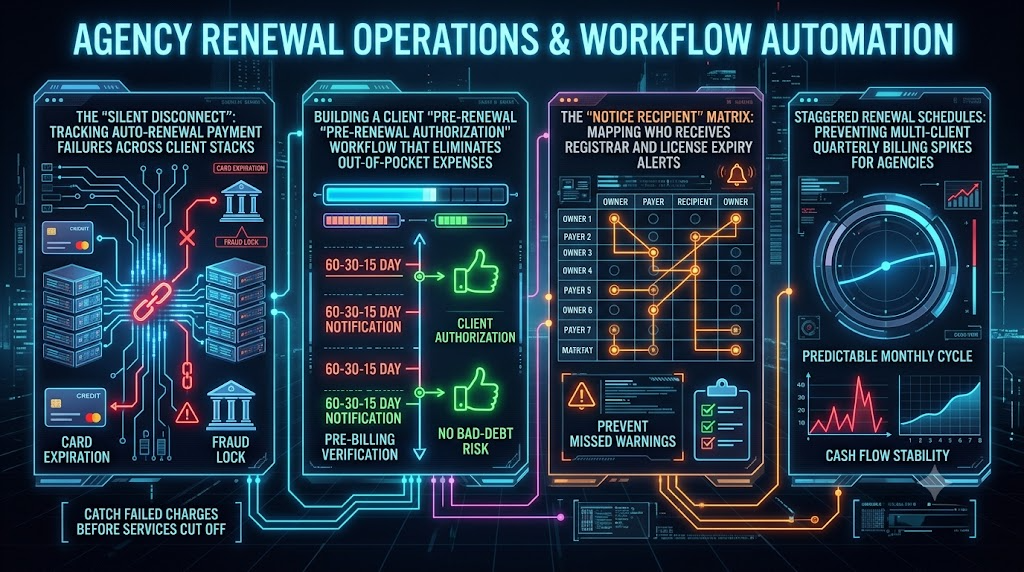
1. The "Silent Disconnect": Tracking Auto-Renewal Payment Failures Across Client Stacks
The Invisible Operational Vulnerability
When a client's store goes offline or a certificate lapses, the agency usually takes the blame first. The root cause is often not a technical fault. A silent auto-renewal failure is a common culprit.
A silent disconnect happens when an upstream provider (a registrar, host, cloud platform or SaaS vendor) fails to collect an automated recurring payment. The failure notice then goes to a mailbox nobody watches, or a team member reads it as routine.
Common Causes of Failed Auto-Charges
              ┌─────────────────────────────────────┐
              │     Auto-Renewal Charge Initiated   │
              └──────────────────┬──────────────────┘
                                 │
      ┌──────────────────────────┼──────────────────────────┐
      ▼                          ▼                          ▼
┌────────────────┐    ┌─────────────────────┐    ┌─────────────────────┐
│ Card replaced  │    │ Issuer decline or   │    │ Limit reached, card │
│ or expired     │    │ authentication      │    │ closed or billing   │
│                │    │ challenge           │    │ details changed     │
└───────┬────────┘    └──────────┬──────────┘    └──────────┬──────────┘
        └──────────────────────────┼──────────────────────────┘
                                 ▼
              ┌─────────────────────────────────────┐
              │ Failed charge → unseen notice →     │
              │ service suspension or expiry        │
└─────────────────────────────────────┘- Replaced or expired cards. When a card is reissued, the vendor's stored card can go stale. Card networks run updater services (Visa Account Updater and Mastercard's Automatic Billing Updater) that pass new card details to participating processors. These services are enrolled by the merchant side, so an agency cannot switch them on for a vendor it pays. Treat card expiry as your own tracking responsibility.
- Issuer risk declines. Banks can decline or hold unusual charges, such as a large annual bill, a first-time foreign merchant or a charge in a different currency. Whether a given charge trips a filter depends on the issuer, so don't assume a card that worked last year will work this year.
- Limits and virtual cards. Single-use or time-limited virtual cards set up for one vendor can lapse or run short before the annual renewal. Credit limits consumed by other spend cause the same failure.
- Authentication rules (PSD2 and SCA). In the EEA and UK, Strong Customer Authentication applies to the customer-initiated payment that sets up a subscription. Subsequent merchant-initiated charges on a saved card, such as subscription renewals, are generally out of SCA scope. This is a different rule from the common claim that renewals over a threshold require verification. Failures still happen in practice. Issuers can challenge any transaction, and a vendor that raises the price or changes the plan may need a fresh authentication from the cardholder. Chargebee notes that a changed subscription amount can require 3D Secure again on the first charge at the new amount. A vendor that mis-flags a renewal charge can also trigger a decline.
Payment method is only one failure point. Also check who actually receives the vendor's failure emails. AWS, for example, lets you set separate billing, operations and security alternate contacts on each account. AWS recommends using an email distribution list so that no single person is a dependency.
Building a Pre-Billing Verification Workflow
Run a repeatable check ahead of every renewal window. Most vendor dashboards do not expose payment-method status through an API, so plan for a mix of manual checks and your own card data.
- T-minus 30 days: inventory and card-health audit. Maintain a master list of which payment card funds which vendor, and pull the expiry dates from your card issuer or finance system. Flag any card expiring within 60 days of an upcoming renewal, and confirm the vendor's billing page shows an unexpired card on file.
- T-minus 14 days: payment-method validation. For cards you collect yourself, such as client cards held in your billing gateway, use a zero-value account verification rather than a small test charge. Card networks discourage $1 authorizations for card verification, and Visa's rules call for zero-value verification messages for stored credentials. Not every issuer supports them. You cannot run this check against a card stored in a vendor's system, so for those, confirm status on the vendor's billing page.
- T-minus 7 days: provider notification parsing. Set up email rules in your tooling (Zapier, Make or custom webhooks) to watch billing mailboxes for phrases like Payment Failed, Declined, Action Required or Past Due. Route matches into your project-management system as urgent tasks.
- T-minus 48 hours: escalation. If a charge has failed, open a high-priority ticket for the account manager. Define in advance which assets qualify for an emergency payment from an agency fallback card. Domains and other low-cost, high-impact items are the usual candidates, and the cost should be re-billed immediately. Anything outside that list follows the authorization rules in Section 2.
What Actually Happens When a Domain Lapses
Domain expiry is rarely instant, but the grace mechanics depend on the registrar and the extension. Under ICANN's Expired Registration Recovery Policy, registrars must send the registrant two notices before expiry, approximately one month and one week out. If the domain is not renewed or is deleted, the registrar must send at least one more notice within five days after expiry. Most gTLD registries also provide a 30-day Redemption Grace Period after deletion. During that period the domain can be restored, but DNS resolution is disabled and transfers are blocked. Redemption fees apply, and registrars set their own additional grace practices, so the site can be down well before the domain is truly lost.
A related deadline: since March 15, 2026, publicly trusted TLS certificates can be issued for at most 200 days. CA/Browser Forum Ballot SC-081v3 cuts that to 100 days from March 15, 2027 and 47 days from March 15, 2029. Any certificate that is still renewed by hand will need more frequent attention each year.
---
2. Building a Client "Pre-Renewal Authorization" Workflow That Eliminates Out-of-Pocket Expenses
The "Fronted Cost" Trap
When a client ignores an invoice, agencies often pay the vendor themselves to keep the site online and hope to recover the money later. This creates bad debt, strains the relationship and puts pressure on cash flow.
The fix is a Pre-Renewal Authorization Framework with three parts: a fixed milestone timeline, contract language that backs it up, and a rule that you don't pay upstream until you hold the client's money.
   T-60 days           T-30 days            T-15 days            T-0
 Audit & price      Authorization         Payment due       Renewal paid
     check             notice             (funds cleared)    with client funds
The 60-30-15 Day Milestone Standard
60 Days Out: Internal Audit and Cost Calculation
- Action: Review upcoming renewals, confirm current vendor pricing and draft the renewal estimate.
- Why now: Prices move. For example, Verisign will raise the .com wholesale fee by about 7%, from $10.26 to $10.97 per year, effective November 1, 2026. Registrars set their own retail prices, so the cost to your client will vary. Domain Name Wire reports that if Verisign takes the maximum increase every year its contract allows, the wholesale price would reach about $13.42 by the end of the current cycle. Quote renewals with the new price in mind.
- Automation: Your CRM or project tool generates a renewal task for the account manager.
30 Days Out: Authorization Notice and Invoice
- Action: Send the formal Pre-Renewal Authorization email and invoice.
- Requirement: State the deadline for payment or written authorization, and state what happens if it is missed.
15 Days Out: Payment Collection Deadline
- Action: Collect payment through your gateway (for example Stripe or QuickBooks Payments).
- Safety rule: Do not pay an upstream vendor until the client's payment has cleared. "Cleared" means different things for different methods:
- Stripe says ACH Direct Debit can take up to four business days to confirm success or failure.
- Consumer-account ACH debits can be returned as unauthorized for up to 60 days. The window is two days for business accounts.
- Card payments can be disputed through chargebacks.Build that settlement time into your deadline, and treat an ACH payment from a business account as lower-risk than one from a consumer account.
0 Days Out: Vendor Payment
- Action: Pay the vendor from collected funds, or confirm that the client's own card processed the renewal.
Contractual Protection Clauses
Add explicit language to your Master Services Agreement. The clause below is a starting template, and a lawyer should adapt it. Enforceability, and how far you can limit liability, depend on your jurisdiction and client type.
Third-Party Renewal & Non-Advancement Policy:
"Agency is not required to advance funds for third-party software licenses, domain registrations, hosting, or API services on Client's behalf. Agency must receive written authorization and full payment at least fifteen (15) calendar days before the vendor's renewal deadline. If authorization or payment is not received by that deadline, Agency may allow the underlying service to expire after written notice to Client. Agency is not liable for service disruption, loss of domain registration or data removal resulting from Client's failure to authorize or pay."
A few notes on the clause:
- Broad language like "assumes no liability for... data removal" may not hold up everywhere. Courts and clients tend to scrutinize it, so keep the carve-out narrow and tie it to documented notices.
- Consider treating the domain separately. Losing a domain can mean losing a brand's web address and email, so many agencies add a written final warning, or a pre-agreed emergency-renewal exception billed at cost plus a handling fee.
---
3. The "Notice Recipient" Matrix: Mapping Who Receives Registrar and License Expiry Alerts
The Root Cause of Missed Expiry Warnings
Critical assets often lapse even when the client has the money. The usual reason is that the warnings went to an unmonitored inbox: a departed employee's address, a generic info@ mailbox, or a spam folder.
An agency can prevent this with a Notice Recipient Matrix that assigns a role for every asset in a client's stack.
The Three Roles Every Asset Needs
                 ┌─────────────────────────────┐
                 │   CLIENT ASSET / SUBSCRIPTION│
                 └──────────────┬──────────────┘
          ┌─────────────────────┼─────────────────────┐
          ▼                     ▼                     ▼
    ┌───────────┐         ┌───────────┐         ┌──────────────┐
    │ WHO OWNS  │         │ WHO PAYS  │         │ WHO RECEIVES │
└───────────┘ └───────────┘ └──────────────┘- Who owns: The legal entity holding rights to the asset. This should normally be the client.
- Who pays: The party funding the account, either the client directly or the agency on a re-billed basis.
- Who receives notices: The monitored address, webhook or distribution list that gets operational alerts.
Know Which Contacts Actually Exist
Domain contact records have changed. ICANN's Registration Data Policy took effect on August 21, 2025, and under it the administrative, technical and billing contact sets are no longer required for most gTLDs. Registrars are generally deleting that data, and only the registrant contact remains mandatory. Registrars send expiry notices to the registrant. Advice to "register our alias as the administrative contact" is therefore outdated for many domains.
In practice:
- Make sure the registrant record names the client as the legal holder.
- Use a role-based, monitored alias as the registrant email. A shared mailbox at the client's domain that forwards to both client and agency keeps ownership clear. If you instead use an agency-controlled address, document that arrangement in your contract.
- Don't use an address on the same domain that is being renewed. If that domain lapses, its own mailboxes stop receiving the warnings.
For cloud accounts, use the vendor's contact features. AWS offers separate billing, operations and security alternate contacts, and organization administrators can manage them across member accounts.
Implementing the Notice Matrix Across Stack Tiers
| Asset Tier | Example Vendors | Account Owner | Payer | Primary Notice Recipient | Secondary Notice Recipient |
|---|---|---|---|---|---|
| Core Infrastructure | AWS, Cloudflare, Google Cloud | Client | Client card | ops@youragency.com (alternate contacts) | tech@client.com |
| Domain Registrars | GoDaddy, Namecheap, Route 53 | Client (registrant) | Agency re-billed or client | Registrant alias that reaches agency and client | billing@client.com |
| CMS / Hosting | Webflow, Shopify, WP Engine | Client | Client card | webmasters@youragency.com | marketing@client.com |
| Premium Plugins | WP Rocket, Elementor, Gravity Forms | Agency or client (check the license terms) | Agency bulk or client | licensing@youragency.com | Internal ops dashboard |
| Third-Party APIs | Twilio, SendGrid, Algolia | Client | Client card | devs@youragency.com | it@client.com |
Plugin license terms vary on whether a license can be used on client sites you don't own, transferred, or reassigned after the engagement ends. Check each vendor's terms before assuming agency-held licenses are portable.
Setting Up Centralized Alert Routing
Avoid individual employee addresses as the main contact on client accounts. When people change roles or leave, alerts go with them.
Instead, create group-monitored aliases on your agency domain:
domains@youragency.com: domain registrar and DNS notices.billing-alerts@youragency.com: hosting, cloud and SaaS billing notices.licensing@youragency.com: plugin licenses and developer tools.
Route these aliases into your project-management or ticketing tool (Jira, Asana, ClickUp, Zendesk or similar) so every notice becomes a trackable ticket.
---
4. Staggered Renewal Schedules: Preventing Multi-Client Quarterly Billing Spikes for Agencies
The Danger of Cash Flow Volatility
Renewal dates tend to cluster when an agency onboards several clients at once or migrates a batch of infrastructure in one quarter. Two problems follow:
- Cash flow dips. Paying a large volume of vendor renewals in one month strains reserves, especially while you wait for client reimbursement.
- Account team overload. Managers handle dozens of authorizations, payment issues and client questions at the same time.
The numbers below are illustrative only. They show the same $109,500 of annual renewals under two distributions.
| Quarter | Clustered renewals | Staggered renewals |
|---|---|---|
| Q1 | $45,000 | $27,375 |
| Q2 | $2,000 | $27,375 |
| Q3 | $4,500 | $27,375 |
| Q4 | $58,000 | $27,375 |
| Total | $109,500 | $109,500 |
The Renewal Normalization Framework
Audit and group renewal dates into predictable monthly or quarterly cycles.
- Phase 1: comprehensive stack audit. Build a master database of every domain, hosting plan, software license and API account across clients. Record the vendor, annual cost, expiry date, billing frequency, owner, payer and notice recipient.
- Phase 2: cohorts and multi-year syncing. Group accounts into balanced monthly cohorts. Domains give you limited control. You can extend a registration at renewal, but the remaining term generally can't exceed ten years. You can lengthen a term, not shorten it, so adjustments push dates later rather than earlier.
- Phase 3: align renewals where vendors allow it. Ask vendors whether they support co-terming, prorating or changing a renewal date. Enterprise and multi-seat plans are more likely to support it than small self-serve plans, so don't assume it is available.
- Phase 4: bundle into the retainer, with a funding rule. Instead of sending large annual invoices, total the client's annual infrastructure cost, add a management or handling margin that reflects your admin time and risk, and bill it as part of the monthly retainer. Set the margin from your own costs, and disclose it in the contract. One caution: if a vendor bills annually and you collect monthly, you are fronting cash for up to eleven months. To avoid that, hold the monthly collections in a dedicated renewal reserve and pay the vendor from it, or collect the annual amount up front for annually billed assets.
Financial Comparison: Annual Lump-Sum vs. Monthly Bundled Retainer
| Metric | Annual Lump-Sum Billing | Monthly Bundled Retainer |
|---|---|---|
| Agency cash flow | Uneven spikes, higher risk of fronting costs | Steadier monthly revenue, provided collections are held in a reserve |
| Client friction | Sticker shock when a large invoice lands | Smaller, predictable recurring charge |
| Administrative load | Multiple invoices, reminders and follow-ups | A single recurring line item |
| Bad-debt exposure | Concentrated in one large invoice | Spread across smaller payments, with the contract setting what happens on missed payment |
| Margin protection | Exposed to vendor price jumps between quote and renewal | Easier to adjust at each contract review |
---
Agency Action Plan: Building Your Automated Renewal Operations
Use this checklist to put the four frameworks into practice:
AGENCY RENEWAL OPERATIONS CHECKLIST

[ ] Step 1: Create centralized agency aliases
    - Set up domains@, billing-alerts@ and licensing@ on your agency domain.

[ ] Step 2: Fix contact records
    - Confirm each domain's registrant is the client with a monitored alias.
    - Set billing, operations and security alternate contacts on cloud accounts.

[ ] Step 3: Add card and payment checks
    - Track card expiries against renewal dates 30 days out.
    - Use zero-value verification for cards you hold in your own gateway.

[ ] Step 4: Adopt the 60-30-15 authorization rule
    - Don't pay an upstream vendor until client funds have cleared.

[ ] Step 5: Update client contracts
    - Add a non-advancement clause, reviewed by your lawyer.

[ ] Step 6: Normalize renewal schedules
    - Audit the stack, group renewals into cohorts and ask vendors about co-terming.
    - If bundling into retainers, fund a renewal reserve.

[ ] Step 7: Re-check price and policy changes each quarter
    - Review upcoming registry price changes and certificate-lifetime rules.
Handled consistently, renewals become a set of scheduled, authorized and funded tasks instead of an emergency. Done well, that means fewer surprise outages and a cleaner bottom line.
---
Sources and Further Reading
- ICANN: Expired Registration Recovery Policy
- INWX: ICANN Registration Data Policy update
- Dreyfus: ICANN's Registration Data Policy, key measures
- Verisign Q1 2026 results (.com wholesale fee)
- Domain Name Wire: Verisign raising wholesale .com prices
- Sectigo: 47-day SSL certificate validity (SC-081v3)
- Adyen: PSD2 SCA and subsequent payments
- European Banking Authority Q&A on payee-initiated transactions
- AWS: Update the alternate contacts for your AWS account
- Stripe: ACH Direct Debit payments
- Webnames: Maximum registration and renewal term