
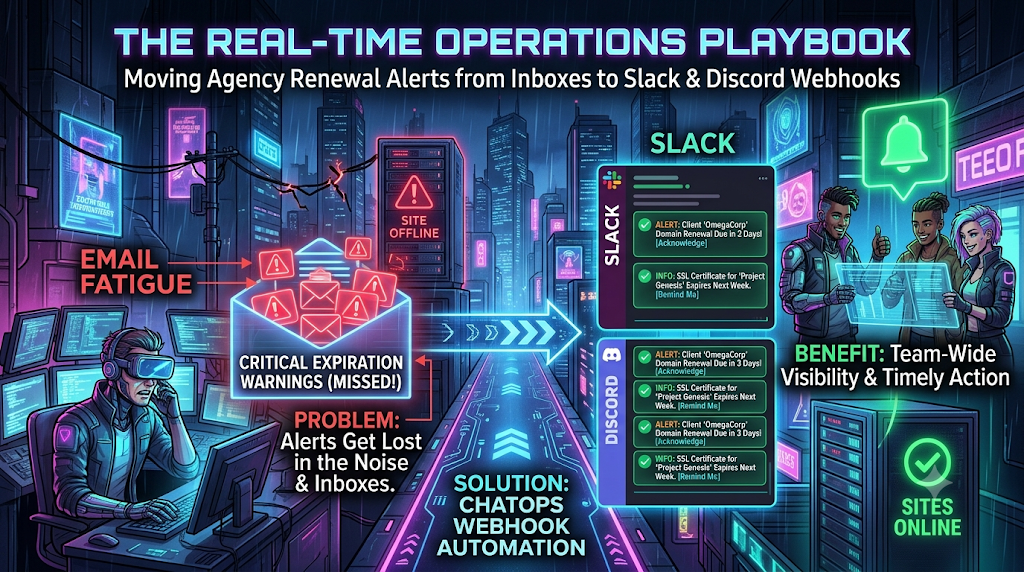
Picture a Friday afternoon at 4:45 PM. Your top retainer client, an e-commerce brand, suddenly loses traffic. Its checkout page shows a full-screen browser warning: NET::ERR_CERT_DATE_INVALID, Chrome’s error for an expired or not-yet-valid certificate. Support tickets pile up, the client’s marketing lead is messaging your account director, and your developers are trying to work out how an SSL renewal went unnoticed.
The post-mortem is familiar. The expiry notice went out weeks earlier, to the mailbox of a project manager who left the agency months ago. Or it sat in a shared ops@ alias, buried under hundreds of automated notifications. (This is an illustrative scenario, but a version of it plays out at agencies every year.)
For agencies and consultancies managing dozens or hundreds of client domains, certificates, hosting accounts and licences, email-only alerting is a structural weakness. It has also become less reliable. Some vendors have stopped sending expiry emails altogether, and certificate lifetimes are shrinking, so renewals come around more often.
This playbook covers why email alerts fail agency operations, how a ChatOps approach improves visibility, and how to route renewal warnings into Slack and Discord with webhooks. It also covers the limits of that approach, so you don’t swap one blind spot for another.
1. Why Email Alone Fails Agency Renewal Tracking
The volume problem
Workplace email estimates vary by source and methodology. Figures from Microsoft’s Work Trend Index, cloudHQ and the Radicati Group put the average office worker at roughly 117 to 126 emails received per day. Microsoft’s 2025 data, as reported by secondary sources, also puts the average worker at around 275 interruptions a day across email, chat and notifications. A renewal notice is automated, usually has a generic subject line, and arrives among all of that. It is easy to miss, and nothing makes anyone act on it.
The notices you depend on typically come from:
- Domain registrars (GoDaddy, Namecheap, Cloudflare Registrar, Amazon Route 53 and others).
- Certificate authorities and hosting providers for SSL/TLS expiry.
- Hosting, server and CDN vendors with billing and plan-expiry notices.
- Plugin, theme and SaaS vendors with licence renewals.
Vendors are sending fewer notices
Don’t assume a warning email will arrive at all.
- Let’s Encrypt ended its expiration notification emails on June 4, 2025. It said most subscribers had automated renewal, that the emails cost tens of thousands of dollars a year, and that storing the email addresses was a privacy burden. It pointed users to third-party monitoring services instead, such as Red Sift’s free tier for up to 250 certificates.
- For domains, ICANN’s Expired Registration Recovery Policy sets only a minimum. Registrars must notify the registrant at least twice before a gTLD registration expires, roughly one month and roughly one week out, plus once within five days after expiry if it hasn’t been renewed. That is the floor. If those two emails go to a stale address, the policy has been met and you still have an outage.
The bystander effect in shared inboxes
Many agencies send administrative notices to a shared alias such as ops@, billing@ or hosting@. This invites what social psychologists call diffusion of responsibility, the mechanism behind the bystander effect studied by Darley and Latané in the 1960s. When five people can see a message, each assumes someone else will deal with it. The notice sits unread, gets archived, or gets forwarded with “can someone check this?” and no named owner.
Where inboxes fall short
Email is a passive medium. It shows you information only if you look. When a renewal warning arrives as a plain email:
- Triage is clumsy. Standard inboxes have no built-in way to claim, assign or mark a message as handled. Shared-inbox tools can add this, but the alert still starts as an email.
- Context is missing. The recipient often doesn’t know who owns the client account, whose card pays, or when the billing cycle renews.
- Accountability fragments. A forwarded notice spawns
Re: Fwd: Re:threads in which ownership dissolves.
2. What Is ChatOps, and Why Webhooks?
ChatOps means putting operational tooling, alerts and automation into the chat channels where the team already works. Instead of expecting people to check registrar dashboards and inboxes, you push the alert into a channel such as #ops-renewals.
Moving renewal alerts into Slack or Discord through webhooks helps in four ways:
- Shared visibility. Everyone in the channel sees the alert at the same moment. There is no hidden inbox.
- Lightweight triage. A 👀 reaction can mean “I’m on it” and a ✅ can mean “renewed and verified”. Both platforms support emoji reactions.
- Threaded context. Discussion about billing approval, client cards or DNS stays attached to the alert, so the main channel stays readable.
- Faster attention. Chat apps push to desktop and mobile, and chat alerts avoid the spam-filter and tab-sorting problems email has. You still need to design for people who mute channels (see section 6).
3. Know What You’re Tracking
Before wiring anything, catalogue every expiring asset you manage for clients. Lifecycle facts have changed recently, particularly for certificates.
| Asset type | Typical lifecycle | Impact of expiry | Suggested warning thresholds |
|---|---|---|---|
| SSL/TLS certificates | Let’s Encrypt: 90 days today, 64 days by default from Feb 10, 2027, 45 days in 2028. Commercial CAs: 200-day maximum since March 15, 2026, 100 days from March 15, 2027, 47 days from March 15, 2029 | Browser warnings, lost user trust, broken API calls | Scale to lifetime. For 200- or 90-day certificates, 30, 14, 7 and 1 days. For 47-day certificates, 30 days is most of the lifetime, so scale proportionally |
| Domain registrations | 1 to 10 years | Site and email go offline. After expiry the domain can enter redemption and, eventually, be deleted and re-registered by someone else | 60, 30 and 7 days |
| Hosting, servers, cloud plans and credits | Monthly or annual | Suspension, and potentially deletion after the vendor’s retention window | 14, 3 and 1 days |
| Premium plugins and SaaS licences (e.g. WP Rocket, Advanced Custom Fields Pro, Gravity Forms) | Usually annual | Updates and support stop. Whether features keep working depends on the vendor | 30 and 7 days |
| API keys and OAuth tokens | Varies widely, from days to years | Silent integration failures (CRM syncs, payments, reporting) | 14 and 3 days |
Thresholds are starting points. Adjust them to how long your team needs to procure, approve and apply a renewal.
Why certificate timelines matter now
The CA/Browser Forum’s Ballot SC-081v3, approved in April 2025, cuts maximum public TLS certificate validity from 398 days to 47 days in three steps: 200 days from March 15, 2026, 100 days from March 15, 2027 and 47 days from March 15, 2029. Let’s Encrypt is moving faster. It will switch its default to 64-day certificates on February 10, 2027, and to 45-day certificates in February 2028. Its staging environment began issuing 64-day certificates on October 14, 2026.
For an agency, that means more renewal events per site per year, and any script or runbook with a hard-coded 90-day assumption is a liability. Automating issuance helps, but it makes alerting on failed renewals more important. A silently failing renewal job is now the likeliest way a certificate expires.
4. Where Do the Alerts Come From?
A webhook is only a delivery mechanism. Something has to decide that an asset is expiring. Realistic sources include:
- Your own asset register, with expiry dates, owners and billing contacts. This is the only source that covers licences, SaaS and hosting plans, which have no public lookup.
- Public lookups. For domains, registration data including expiry date is available through RDAP, the successor to WHOIS. ICANN’s WHOIS requirements for gTLD registries and registrars were retired in January 2025. For certificates, you can connect to a site and read the certificate’s
notAfterdate directly. - Renewal job output. If you use Certbot or another ACME client, alert on a failed or skipped renewal rather than waiting for the expiry window. Certbot supports hooks for this.
You can assemble the delivery side with custom scripts, low-code tools such as n8n or Make, or a dedicated expiration-tracking product. For example, TokenTimer describes itself as a metadata-only expiration tracker for certificates, API keys and licences, with alerting to Slack, Teams, Discord, PagerDuty and webhooks. Whatever you choose, treat the chat message as a notification layer. Keep the authoritative record of what expires, who owns it and who pays somewhere durable.
5. Building the Pipeline
Step 1: Create a Slack webhook
- Go to api.slack.com/apps and create a Slack app (or open an existing one) for your workspace.
- Open Incoming Webhooks and switch on Activate Incoming Webhooks.
- Choose Add New Webhook to Workspace, pick the target channel (for example
#agency-infra-alerts) and authorise it. - Copy the webhook URL.
Things to know:
- Each webhook URL is bound to one channel. Slack’s documentation says you can’t override the channel, username or icon per message, so you create a webhook per channel.
- Treat the URL as a secret. Anyone who has it can post to that channel. Slack says it actively searches for leaked webhook URLs, including in public repositories, and revokes them, so a URL committed to public code can simply stop working. Store it in a secrets manager or environment variable.
- Rate limit. Slack allows roughly one message per second per channel through incoming webhooks, with short bursts tolerated. Exceeding it returns an HTTP 429 with a
Retry-Afterheader. Batch alerts into digests instead of sending one message per asset. - Free-plan limits. Free workspaces are capped at 10 third-party or custom apps and show only the last 90 days of messages and files, with older data deleted after a year. Free workspaces also don’t support user groups, which matters for the escalation tier in section 6.
Step 2: Create a Discord webhook
You need the Manage Webhooks permission on the server.
- Open the channel’s settings (the gear icon next to
#ops-alerts), or Server Settings. - Select Integrations, then Webhooks.
- Click New Webhook, name it (for example
Agency Ops Sentinel) and copy the Webhook URL.
Things to know:
- Message content is limited to 2,000 characters. An embed message can include up to 10 embeds, with a combined limit of 6,000 characters across them. Individual fields are capped at 1,024 characters.
- Discord’s webhook rate limit is roughly 5 requests per 2 seconds per webhook. Read the
X-RateLimit-RemainingandX-RateLimit-Reset-Afterresponse headers rather than hard-coding a delay. - As with Slack, the URL is a credential. Anyone holding it can post to the channel.
Step 3: Design the alert payload
A badly formatted chat message gets ignored as easily as an email. A useful renewal alert contains:
- Client and asset name, so nobody has to look up what
shop.acmecorp.combelongs to. - Asset type: SSL certificate, domain registration, hosting plan or licence.
- Exact expiry date and countdown, for example “Expires in 14 days (Nov 29, 2026)”.
- A named owner.
- A direct link to the registrar, billing portal or client record.
Sample Slack payload (Block Kit)
Slack recommends including a top-level text field alongside blocks. It is used for notification previews, which would otherwise be empty. Also note that a human-readable @name does not create a mention in a webhook payload. You need the member’s Slack user ID in the form <@U012AB3CD>.
{
  "text": "Urgent renewal warning: SSL certificate for shop.acmecorp.com expires in 7 days",
  "blocks": [
    {
      "type": "header",
      "text": {
        "type": "plain_text",
        "text": "🚨 Urgent Renewal Warning: SSL Certificate",
        "emoji": true
      }
    },
    {
      "type": "section",
      "fields": [
        { "type": "mrkdwn", "text": "*Client:*\nAcme Corp E-Commerce" },
        { "type": "mrkdwn", "text": "*Domain:*\n`shop.acmecorp.com`" },
        { "type": "mrkdwn", "text": "*Expires in:*\n*7 days (Nov 22, 2026)*" },
        { "type": "mrkdwn", "text": "*Assigned owner:*\n<@U012AB3CD>" }
      ]
    },
    {
      "type": "actions",
      "elements": [
        {
          "type": "button",
          "text": { "type": "plain_text", "text": "Open Cloudflare Dashboard" },
          "url": "https://dash.cloudflare.com",
          "action_id": "button-link"
        }
      ]
    }
  ]
}
Sample Discord payload (embed)
Embeds carry a decimal colour value, which lets you colour-code by urgency. 16763904 is amber (#FFCC00) and 16711680 is red (#FF0000).
{
  "embeds": [
    {
      "title": "⚠️ Domain Registration Expiring Soon",
      "description": "The registration for **client-portfolio.com** expires soon. Action is required to prevent a service disruption.",
      "color": 16763904,
      "fields": [
        { "name": "Client", "value": "Portfolio Global", "inline": true },
        { "name": "Registrar", "value": "Namecheap", "inline": true },
        { "name": "Time remaining", "value": "14 days (Nov 29, 2026)", "inline": false },
        { "name": "Owner", "value": "Account manager: Priya", "inline": true }
      ],
      "footer": { "text": "Agency Ops Sentinel • Verify auto-renew status and payment method" }
    }
  ]
}
A minimal certificate-expiry check
The script below, using only Python’s standard library, checks how many days remain on a site’s certificate and posts to Slack. Run it on a schedule with cron, a CI scheduler or an automation tool.
import json, os, socket, ssl, urllib.request
from datetime import datetime, timezone

WEBHOOK_URL = os.environ["SLACK_WEBHOOK_URL"]  # keep out of source control

def days_until_expiry(hostname: str, port: int = 443):
    ctx = ssl.create_default_context()
    with socket.create_connection((hostname, port), timeout=10) as sock:
        with ctx.wrap_socket(sock, server_hostname=hostname) as tls:
            cert = tls.getpeercert()
    expires = datetime.fromtimestamp(
        ssl.cert_time_to_seconds(cert["notAfter"]), tz=timezone.utc
    )
    return (expires - datetime.now(timezone.utc)).days, expires

def post_to_slack(text: str) -> None:
    req = urllib.request.Request(
        WEBHOOK_URL,
        data=json.dumps({"text": text}).encode("utf-8"),
        headers={"Content-Type": "application/json"},
    )
    urllib.request.urlopen(req, timeout=10)

for host in ["shop.acmecorp.com"]:
    try:
        days, expires = days_until_expiry(host)
        if days <= 30:
            post_to_slack(f"{host}: certificate expires in {days} days ({expires:%b %d, %Y})")
    except ssl.SSLCertVerificationError as err:
        # An already-expired certificate fails the handshake, so alert on that too.
        post_to_slack(f"🚨 {host}: certificate verification failed: {err.verify_message}")
Two cautions. First, an already-expired certificate makes the handshake fail, so catching verification errors is essential. Second, this checks only publicly reachable hosts. It tells you nothing about domain registrations, licences or internal certificates. For Discord, post {"content": text} instead of {"text": text}. If you get blocked, set an explicit User-Agent header, since some default library user agents are rejected.
6. Escalation Policies and Noise Control
Moving alerts into chat creates a new failure mode: chat fatigue. If a script posts a loud alert every day for an asset expiring in 90 days, people will mute the channel, and you have rebuilt the email problem in a new tool. Use a tiered matrix:
- Early warning (60 to 30 days out).
- Destination: a low-priority channel such as
#ops-backlog. - Frequency: a weekly digest or a single summary message, with no pings.
- Purpose: time for account managers to confirm billing details and check that the card on file is valid.
- Active action (14 to 7 days out).
- Destination:
#infrastructureor your engineering channel. - Frequency: a daily reminder until someone claims it with a 👀 reaction.
- Purpose: prompt a developer or sysadmin to start the renewal or verify that automation ran.
- Emergency (48 to 24 hours out).
- Destination: an incident or leadership channel.
- Frequency: an urgent alert that names the on-call owner or group, for example
<@U012AB3CD>or a Slack user group such as<!subteam^S12345|devops-leads>. User groups require a paid Slack plan. - Purpose: make sure a named human sees it before the client is affected.
A mention is a stronger signal than a channel post, but it is not guaranteed to override someone’s notification settings, such as Do Not Disturb. For the last tier, consider also sending to an on-call paging tool, or at least a direct message to the asset owner.
7. What ChatOps Doesn’t Fix
Be clear about the limits before you roll this out:
- Garbage in, garbage out. If your asset register is incomplete, or an alert depends on a registrar email going to an abandoned mailbox, chat delivery won’t help. Fix notice contacts and ownership records first.
- Chat history is not a permanent audit trail. On Slack’s free plan, messages older than 90 days are hidden and data older than a year is deleted. Paid plans have retention settings. If you need a durable record of who renewed what and when, log it in your register or ticketing system.
- Webhook URLs are credentials. Store them as secrets, rotate them if exposed, and scope one per channel.
- Webhooks are one-way. Slack’s incoming webhooks don’t return the posted message’s
tsidentifier, so a script can’t easily post threaded follow-ups. People can still reply in threads, and thechat.postMessageAPI supports scripted threading if you need it. - Alerts need an owner. Emoji reactions only help if someone is responsible for the channel. Name an owner for each client asset.
8. Measuring Success
Avoid claiming “zero outages”. Track measurable indicators instead:
- Assets with a named owner, as a share of everything you manage.
- Time from alert to acknowledgement (first 👀 reaction).
- Renewals completed before the 7-day mark versus last-minute scrambles.
- Near-misses: assets caught inside 48 hours, which show where earlier tiers are failing.
- Unplanned expiry incidents per quarter, compared with your baseline before the change.
Review the numbers quarterly. If the near-miss count isn’t falling, the problem is probably ownership or data quality rather than the delivery channel.
Conclusion: Make Expiry Visible Where Work Happens
Email wasn’t built to hold a team accountable for time-sensitive infrastructure. Vendors are sending fewer notices, certificates are renewing more often, and a single missed message can take a client’s site offline. Routing renewal alerts into Slack or Discord won’t fix a messy asset register, but combined with clear ownership, tiered escalation and a durable record of renewals, it makes expiry visible to the people who can act on it.
Start small. List every domain, certificate and licence you manage and who gets each notice today. Then create one webhook for one channel, send your first digest, and name an owner for every asset.