
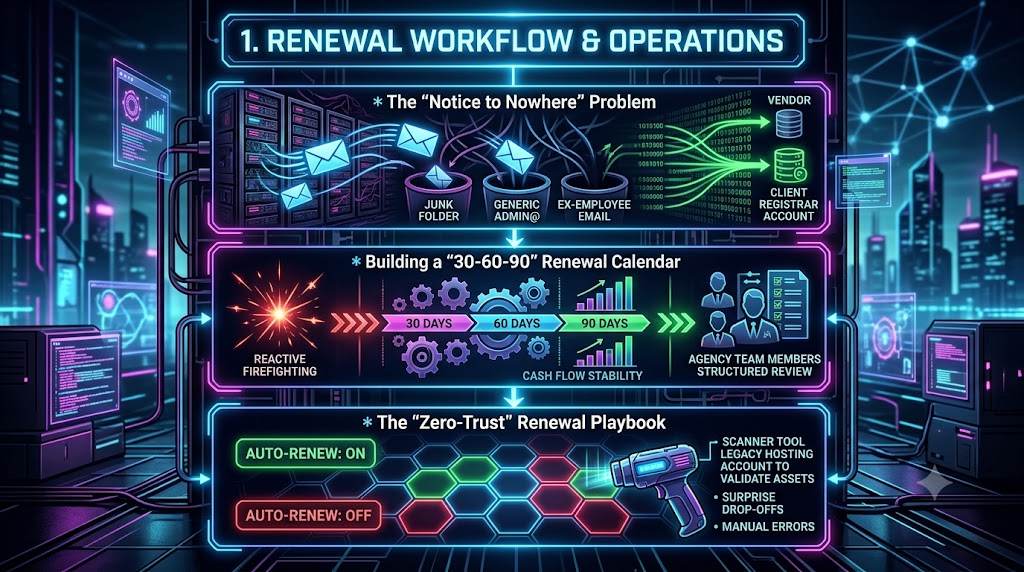
Digital agencies, managed service providers (MSPs), and IT consultants routinely manage dozens, sometimes hundreds, of client web assets. Among the daily pressure of client requests and feature deployments, renewal housekeeping can turn into a silent liability.
Domain names lapse, SSL/TLS certificates expire mid-campaign, and premium plugin licenses quietly deactivate. These failures rarely come from technical incompetence. They are almost always operational failures: renewal notices sent to the wrong inbox, reactive scheduling, and a habit of trusting an “Auto-Renew: ON” toggle without checking that it works.
This guide is an operational playbook for agencies. It covers three problems: renewal notices that never reach anyone, renewals handled as one-off emergencies, and auto-renew settings that are assumed to work but never verified.
---
1. The “Notice to Nowhere” Problem
Mapping Renewal Email Routing Across 50+ Client Accounts
The scenario is familiar. On a Tuesday morning, a client’s website stops resolving. The team investigates and finds that the domain expired and the registrar has taken it out of service. The client checks their inbox and finds nothing. The registrar did send reminders, but to an address belonging to an operations manager who left the company eighteen months ago.
This is the “Notice to Nowhere” problem. The notices existed, but nobody who could act on them ever read them.
What the Registrar Is Actually Required to Send
For generic top-level domains (gTLDs such as .com, .net and .org), ICANN’s Expired Registration Recovery Policy (ERRP) sets a floor for what registrars must do:
- Two pre-expiration notices. One goes out approximately one month before expiration and one approximately one week before. ICANN treats the notices as compliant if they are sent 26 to 35 days and 4 to 10 days before expiration, respectively.
- A post-expiration notice. At least one additional notice must go out within five days after expiration.
- A Redemption Grace Period. gTLD registries (sponsored gTLDs excepted) must offer a 30-day Redemption Grace Period after a registration is deleted. During it the registrar can restore the domain, but DNS resolution is disabled and transfers are prohibited.
Two points matter for agencies. First, the policy governs gTLDs. Country-code TLDs set their own rules, and some have no redemption period at all. Second, the policy sets a minimum of notices, not a guarantee that anyone reads them. Every one of those notices goes to whatever email address is on file for the registrant.
The Domain Lifecycle After Expiration
The typical gTLD lifecycle runs as follows. Exact timing varies by registry and registrar, and many registrars use shorter windows than the maximums.
| Stage | Typical duration | What it means |
|---|---|---|
| Auto-Renew Grace Period | Up to 45 days after expiry | The domain can usually be renewed at the standard price. The registrar may already have disabled or parked the site. |
| Redemption Grace Period | 30 days | The registrar can restore the domain, usually for an extra fee. DNS is disabled and transfers are blocked. |
| Pending Delete | About 5 days | The domain can no longer be restored. |
| Released | After Pending Delete | The domain becomes available for anyone to register, and drop-catching services compete for valuable names. |
The practical lesson is that the cheap, painless window is the one in which nobody has yet noticed the problem.
The Anatomy of Routing Failures
Agencies typically inherit client infrastructure spread across many registrars and hosts. The same four failure patterns recur:
- Generic inbox black holes. Accounts registered to
admin@,info@orwebmaster@aliases often have no individual owner. When someone leaves or forwarding breaks, alerts pile up unread. - Ex-employee mailboxes. If a billing contact leaves and their mailbox is deactivated or archived, reminders vanish silently.
- Spam filtering and quarantine. Automated billing notices contain links and transactional language that can trip enterprise spam filters.
- Personal-account ownership. Clients often bought domains or hosting with a personal Gmail or Yahoo address before hiring the agency, which separates the account from any business workflow.
Why Looking Up Contacts Is Harder Than It Used to Be
Mapping routing starts with finding out where notices go. That has become harder:
- WHOIS has been replaced by RDAP for gTLDs. ICANN announced that as of 28 January 2025, the Registration Data Access Protocol (RDAP) is the definitive source for gTLD registration data in place of the sunsetted WHOIS services.
- Registrant contact data is mostly redacted. A public lookup typically returns the registrar, dates, nameservers and status codes, but not the registrant’s name or email. ICANN’s Registration Data Policy, which took effect on 21 August 2025, replaced the earlier GDPR-era Temporary Specification and sets the baseline for what gTLDs publish.
- The reliable source is the account itself. To see what a registrar actually has on file, log into the registrar account or ask the registrar. For non-public gTLD data you do not control, ICANN points requesters to the Registration Data Request Service (RDRS) or the sponsoring registrar’s own disclosure process.
An RDAP lookup is still useful for a quick independent check of expiry date, registrar and status codes. It is not a way to discover who receives the reminders.
A Step-by-Step Mapping Protocol
- Inventory every account. For each client, list the registrar, host and license vendor, which login owns it, and which email address receives its notices. Pull this from the account panels rather than from public lookups.
- Create dedicated, monitored agency aliases. Use a distribution address such as
renewals@youragency.comthat reaches several people, so no single departure silences it. - Separate ownership from operational notices. Keep the client as the legal registrant, but add the agency alias as a notification or billing contact wherever the provider allows it. Where a provider offers only one email field, decide deliberately who receives it and record that decision.
- Test delivery. Trigger a test notice where the provider allows it, or confirm with the provider that the contact on file is correct. Then check that messages are not landing in quarantine on either side.
- Put the contact details in your asset register. Record the notice-contact email, account owner and billing owner next to each renewal date, so an inbox change at the client does not go unnoticed. A record-keeping tool such as InstaRenewal can hold these fields alongside renewal dates and ownership notes. It is a manual renewal-date and ownership record, not a mailbox monitor, so someone still has to update it when contacts change.
- Route reminders to a place people actually work. Forward notices or reminder alerts into a shared inbox or ticket queue where tasks are assigned and have deadlines.
A Note on Certificate Notices
Do not assume the certificate authority will remind you. Let’s Encrypt, for example, ended its expiration notification emails on 4 June 2025, citing the spread of reliable renewal automation. It recommends third-party monitoring for anyone who still wants expiry warnings. For any certificate your agency relies on, either confirm that automated renewal is working or track the expiry date yourself.
---
2. Building a 30-60-90 Renewal Calendar: Batching Care Plan Audits Quarterly
Handling each renewal as it appears produces unpredictable fire drills, inconsistent client communication and extra administrative work. A 30-60-90 renewal calendar replaces that with a repeating quarterly review.
The idea is simple. Once per quarter, pull every asset that will expire in the next 90 days and work through them in three stages.
| Window | Focus | Action items |
|---|---|---|
| 90 days out | Discovery and health audit | List every domain, certificate, hosting plan and license expiring in the target period. Check expiry dates against the provider dashboard and an independent lookup. Flag unused add-ons, abandoned plugins and duplicate services. |
| 60 days out | Client alignment and approval | Send the client a consolidated summary of what is renewing and what it costs. Confirm who pays and secure approval. Decide on upgrades, downgrades or cancellations. |
| 30 days out | Execution and verification | Renew manually where the plan calls for it, and confirm that auto-renew is set for the rest. Check the payment method on file. Record confirmations, invoices and new expiry dates in the asset register. |
Why 30 Days Is a Sensible Last Checkpoint
ICANN’s required notice schedule is itself built around the 30-day mark, since the first reminder is due roughly one month before expiration. Your own final checkpoint should come no later than the registrar’s first reminder. That leaves time to fix a payment problem, change an ownership issue or reach a client who is on holiday.
Implementing Quarterly Batching
- Schedule fixed audit sprints. Reserve the same week each quarter, for example the first week of January, April, July and October.
- Standardize client reporting. Send one consolidated renewal summary per client per quarter instead of scattered individual invoices. This is a workflow choice. Tidier billing is a reasonable expectation, but it depends on your contracts and how clients prefer to be billed.
- Keep one asset register. Normalize renewal dates from every provider into a single list, with the owner, payer and notice contact for each asset.
- Pull renewals into the quarter that precedes them. Anything expiring in the first weeks of the next quarter should be reviewed now, not three months later.
The Quarterly Cadence Has a Blind Spot: Short-Lived Certificates
A quarterly review works well for assets that renew annually, such as domains, hosting plans and licenses. It does not work for TLS certificates, because certificate lifetimes are shrinking. Under CA/Browser Forum Ballot SC-081v3, approved on 11 April 2025, the maximum validity of publicly trusted TLS certificates is being cut in stages:
| Effective date | Maximum validity |
|---|---|
| Until 14 March 2026 | 398 days |
| 15 March 2026 | 200 days |
| 15 March 2027 | 100 days |
| 15 March 2029 | 47 days |
The 200-day limit is already in force. Certificates issued from March 2027 will last at most about three months, so a certificate could easily expire between two quarterly audits. Use the quarterly review to confirm that automated certificate renewal is in place and working, for example via ACME-based issuance or your host’s managed certificates, rather than to track certificate dates by hand. Treat manual date-tracking for certificates as a fallback, not the primary control. The same ballot also shortens how long domain-validation data can be reused, down to 10 days by 2029, which makes automated validation more important still.
---
3. The “Zero-Trust” Renewal Playbook: Verifying Auto-Renew Across Legacy Hosting Accounts
“Zero trust” in this context is borrowed shorthand for a simple rule: verify, don’t assume. A dashboard toggle that reads “Auto-Renew: ON” tells you that the provider intends to charge a card. It does not tell you the charge will succeed.
Common Auto-Renew Failure Modes
- Expired or replaced payment methods. Cards expire, are reissued after fraud alerts, or hit their limits before the renewal date. Failed and expired payments are among the most common causes of involuntary subscription churn.
- Payments tied to the wrong person. A card belonging to a founder, an ex-employee or the previous agency may be the only thing keeping a renewal alive.
- Card-issuer authentication challenges. In the European Economic Area, Strong Customer Authentication (SCA) under PSD2 applies to the first payment, but later recurring charges that are properly flagged as merchant-initiated are generally exempt. The risk is narrower than it is often described. Issuers can still challenge a recurring charge for any reason, and an account that was set up in a way that does not meet the merchant-initiated requirements, or that was paused and restarted, may need the customer to re-authenticate. A failed charge of this kind needs a person to act, and nobody will notice if the notice goes to nowhere.
- Account migrations. When a host moves legacy accounts to new billing infrastructure, a stored payment profile may not carry over cleanly. Check this after any provider migration or acquisition.
- Different renewal timing per provider. Providers attempt renewal at different points before or after expiry, and some retry for days. Read each vendor’s documentation rather than assuming a standard schedule.
The Zero-Trust Verification Checklist
For every legacy or inherited account, work through these checks:
- Payment method audit. Confirm which card or account pays, who owns it, and that it will still be valid at the renewal date. A common internal rule is to flag any card expiring within the next 90 days.
- Fallback payment method. Where the provider supports a backup payment method, add one that the agency or client controls and monitors.
- Notice contacts. Confirm that billing and expiry alerts go to an address someone reads (see Section 1).
- Early manual renewal for critical assets. For domains, renewing 30 to 45 days early is low-risk because the renewal extends the existing term and does not shorten it. This tests the whole payment path while there is still time to fix a failure.
- Independent expiry check. Compare the provider dashboard against an independent source such as an RDAP lookup for domains, or a certificate expiry check for public sites. A mismatch is a red flag worth investigating.
- Record the result. Log the date you verified, what you checked and who confirmed it, so the next audit starts from a known state.
Where Tools Fit
A renewal-tracking platform can support this process by holding the renewal date, the account owner, the payer and the notice contact in one place, and by sending reminders ahead of expiry. InstaRenewal is built for this kind of manual renewal-date and ownership record-keeping across domains, SSL/TLS certificates, hosting accounts and plugin or software licenses. It is not a credential vault, an identity and access management system, or a security-auditing tool. It does not log into provider accounts or confirm that a payment will go through, so the verification steps above still need a person to carry them out.
---
Technical Appendix: Standardized Renewal Audit Checklist
Use this checklist during quarterly care plan audits.
Phase 1: Contact and Routing Verification
- Confirm the registrant, billing and notice-contact emails in each provider account, not just in public lookups.
- Confirm that notices route to an active agency alias or a monitored client address.
- Check delivery of a test notice where the provider supports one, and check spam and quarantine folders.
- Record the account owner, payer and notice contact in the asset register.
Phase 2: Expiration and Health Assessment
- Compare dashboard expiry dates with an independent RDAP lookup for each domain.
- Check certificate expiry dates and confirm that automated renewal is working.
- Identify unused plugins, add-ons and redundant hosting resources.
Phase 3: Payment and Auto-Renew Validation
- Confirm that the primary payment method will still be valid at the renewal date.
- Confirm that a fallback payment method exists, where the provider supports one.
- Renew critical domains manually 30 or more days early.
- Save receipts and record the updated expiry dates in the asset register.
---
Accidental expirations are usually process failures, not technical ones. Fix where notices go, review assets on a fixed quarterly rhythm, and confirm that renewals actually succeed instead of trusting the toggle. Do those three things and your agency can protect client assets and keep care plan work predictable.